 Toybird Labs Blog
This guide is a route into the task-specific articles, not a collection of supposedly universal prompts. You can use the examples without installing an application.
Choose the job before choosing the wording
Writing a reply is creating a document. Extracting an owner from notes is organizing evidence. Comparing quotes is checking conditions. Rehearsing a sales conversation is practising a skill. These jobs need different materials and different checks.
| Job | Bring this material | Aim for this result | Check before using it |
|---|---|---|---|
| Reply to a customer | Received message, confirmed facts, next action | A reply draft | No invented cause or promise |
| Decline a request | Request, firm limits, approved alternatives | Clear refusal and next step | Start date is not mistaken for completion |
| Organize meeting notes | Notes of statements and decisions | Actions with owners and dates | Questions are not turned into agreements |
| Summarize a document | Source, reader and decision | Evidence-linked decision note | Numbers and footnotes are retained |
| Compare options | Quotes and mandatory conditions | A like-for-like table | Unknown does not mean zero or absent |
| Clarify a vague brief | What is known and what is difficult | A few useful questions | Already answered questions are not repeated |
| Rehearse a conversation | Role, stage and objective | Dialogue followed by feedback | Roleplay and coaching stay separate |
| Explain to a new audience | Accurate original and reader's knowledge | An accessible explanation | Simpler wording has not changed conditions |
| Draft instructions | Actual steps, exceptions and checks | A reproducible first draft | No imaginary buttons or steps |
| Organize research | Sources, dates and a question | Facts separated from interpretation | Sources support the individual claims |
Choose one row. You do not need to put every possible safeguard and output type into one enormous prompt.
A small change in purpose changes the output
Suppose you have a proposal. “Summarize this” is not the same job as “identify what a manager must decide before adoption.” The latter may need a cost calculation, a rollout contradiction and missing responsibilities rather than a page-by-page recap.
Or suppose you have three quotes. Start by normalizing participant count and billing units. Ask for a recommendation only after distinguishing mandatory requirements from preferences. This makes the request useful even when the result is “clarify these two points first.”
A reusable request structure
Task: [one specific action]
Purpose: [what the reader will decide or do]
Source material: [the message, notes, document or data]
Confirmed conditions: [dates, limits, required facts]
Unknowns: [what must not be guessed]
Output: [reply, table, questions, checklist or dialogue]
Before finishing: [the particular mistake to check]
These fields are prompts to think, not a mandatory form. A simple task may need only three of them. When a response goes wrong, check which decision-making information was absent rather than simply asking for more detail.
Continue with a complete example
The detailed guides contain the actual input material and an edited completed example. Read the finished result alongside its source; do not treat an attractive answer as proof that the source was understood.
Fix one meaningful difference at a time
After a first answer, give a specific correction: “Keep the amounts and conditions. Move the conclusion first,” or “The date is a communication deadline, not a completion promise. Correct only that sentence.” If the issue is factual, return to the original material before adjusting tone.
For work involving sensitive information, use your organization's approved environment and rules. The same text may be acceptable in one setting and inappropriate in another. Removing names alone is not a complete confidentiality check.
Find uses you have not yet turned into templates
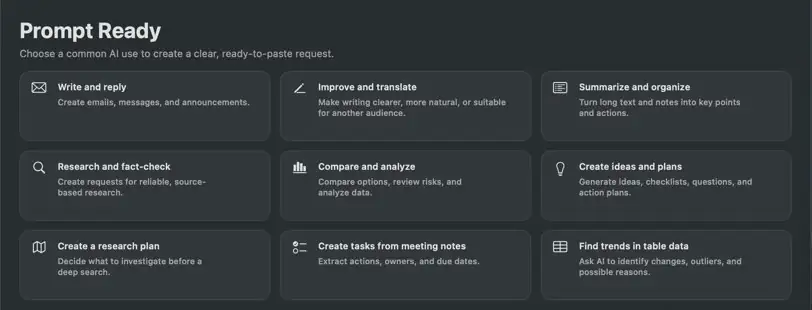
Prompt Ready groups work by purpose. The home screen provides categories; the ideas view makes specific jobs easier to find. They help with two different problems: discovering what to ask an AI to do, and reconstructing the conditions for today's task.
Choose a use, add the source text or topic and conditions, inspect the request, then copy it into your usual AI. Prompt Ready constructs the request locally; it does not write the external AI's answer or send a customer email. Once you paste information into another service, that service's data terms apply.
Start with one task you actually repeat. Keep its completed result and the checks that made it usable. Expand to another task when you understand the first workflow, not merely when you have collected more prompt templates.